
Check steel members to EN 1993-1-1
Utilisation checks every steel beam of an analysed model to EN 1993-1-1 and reports how much of each resistance it uses: 1 is exactly at the limit. Use it to see whether the members are big enough, and which check governs.
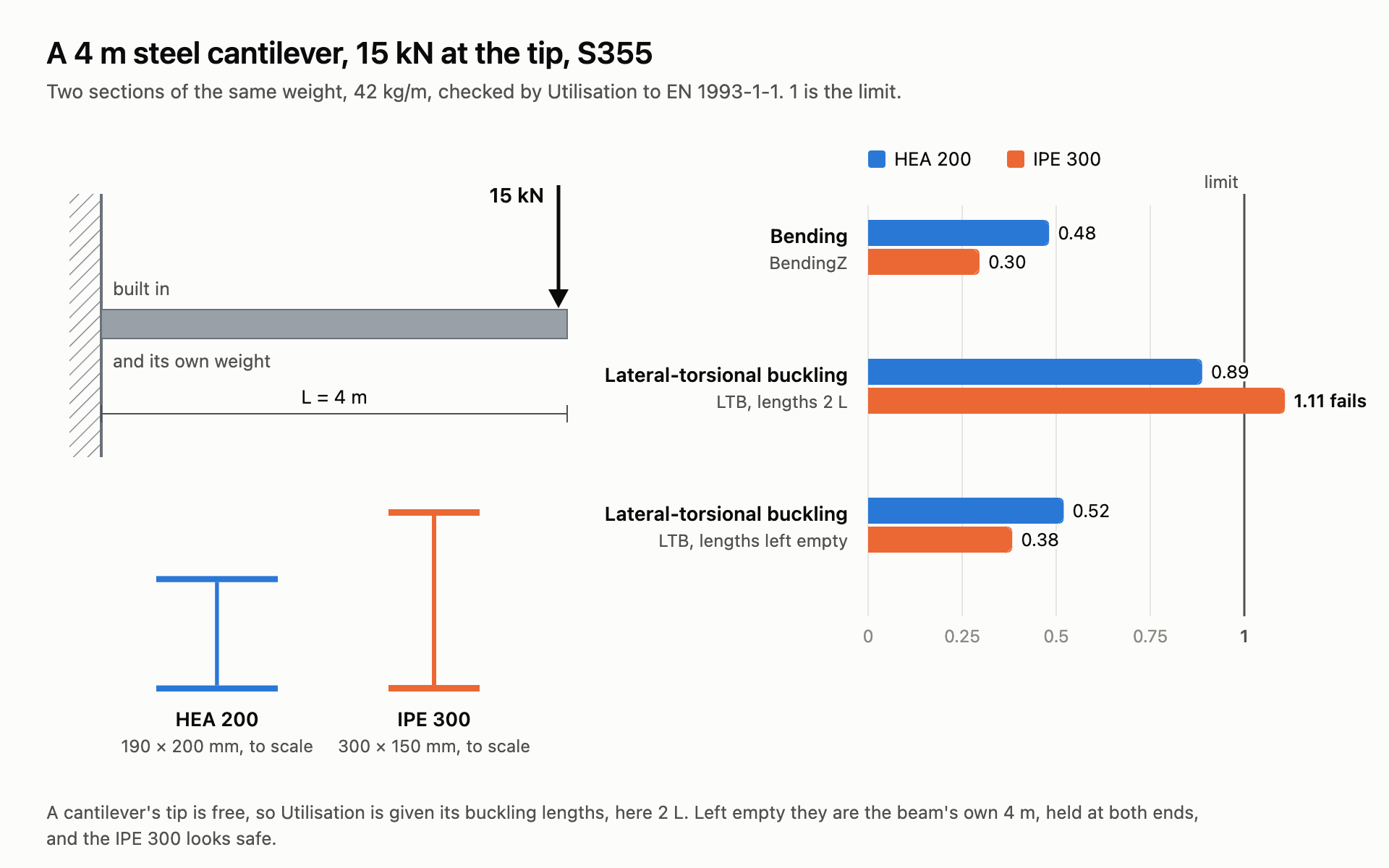
From the Steel Cantilever example: two sections of the same weight, one passes, one fails.
You need
- A steel material with a grade, from Material Library Elastic, with Model
Uniaxial. - A section with a shape: a profile of the Steel Section Library, or an I, hollow, circular, rectangular or double angle section. A Generic Section has no plates to check.
- Force Beam Column beams, assembled and analysed by Run Analysis.
Steps
- On Material Library Elastic, set Type to
Steeland Grade to your grade, or type it into Material Name:S355. The grade goes with the material, and that is how Utilisation knows the beam is steel, and its fy. - Wire the material into the Material input of the Steel Section Library, and pick the profile with Family and Section, or type it into Section Name:
HEA200. Left empty, Material is an elastic steel with no grade, which Utilisation does not check. - Make the beams with that section, assemble the model and run it with Run Analysis.
- Wire the AlpacaModel output of Run Analysis, not of Assemble, into Utilisation. Leave Step at
0for an analysis of one step. - Give the buckling lengths, in
m: LengthY about the minor axis of an I, LengthZ about the major, LengthLT between lateral restraints. Give one value for every beam, or one per beam in the order of the Element output. - Set Load to
Destabilisingwhere the load acts on the top flange, and Sway totruefor members of a frame that buckles by swaying. - Open the Design menu below the component. Set γM0 and γM1 if your National Annex gives other values than
1.0, set Fabrication toWeldedfor welded sections, and turn Report on. - Plug Max, and Governing and Report from the Design menu, into panels.
Check
- Type, in the Design menu, reads
Steelfor every beam.Unknownmeans the material has no grade: the beam is not checked, and the component warns. - Max is 1 or less for a member that passes, and Governing names the check that gives it.
- An empty Max means a check that applies could not be made. Governing says which, and Report why.
Good to know
- Lengths left empty are each beam's own length, held at both ends. A cantilever, a sway column and a member drawn as several beams need their lengths given. The component says so in a remark.
- For an I, local z is the major axis: BendingZ and BucklingZ are about it. Leave the beam's ZAxis empty and the depth of the I points as near straight up as the beam allows.
- Not checked yet: torsional and torsional-flexural buckling, warping torsion, shear buckling of slender webs and Class 4 sections. Bending with compression (6.3.3) is checked on doubly symmetric sections only.
- The forces are the analysis's. Linear Buckling tells you whether second-order effects matter, and gives a buckling length for LengthY or LengthZ.
See also
- Utilisation — every check, its clause and the messages
- Material Library Elastic — the grades, and a database of your own
- Steel Section Library — the 628 profiles
- Steel Cantilever — a cantilever checked, and why its lengths are 2 L
- Footbridge Study — 108 truss designs, each checked with Utilisation