
Topology Optimisation
Finds where a solid needs its material. Model a block - the space the structure may take up - in SSP Bricks or tetrahedra, support it and load it as usual, and Topology Optimisation finds which part of it to keep to make it as stiff as possible with the share of material you allow.
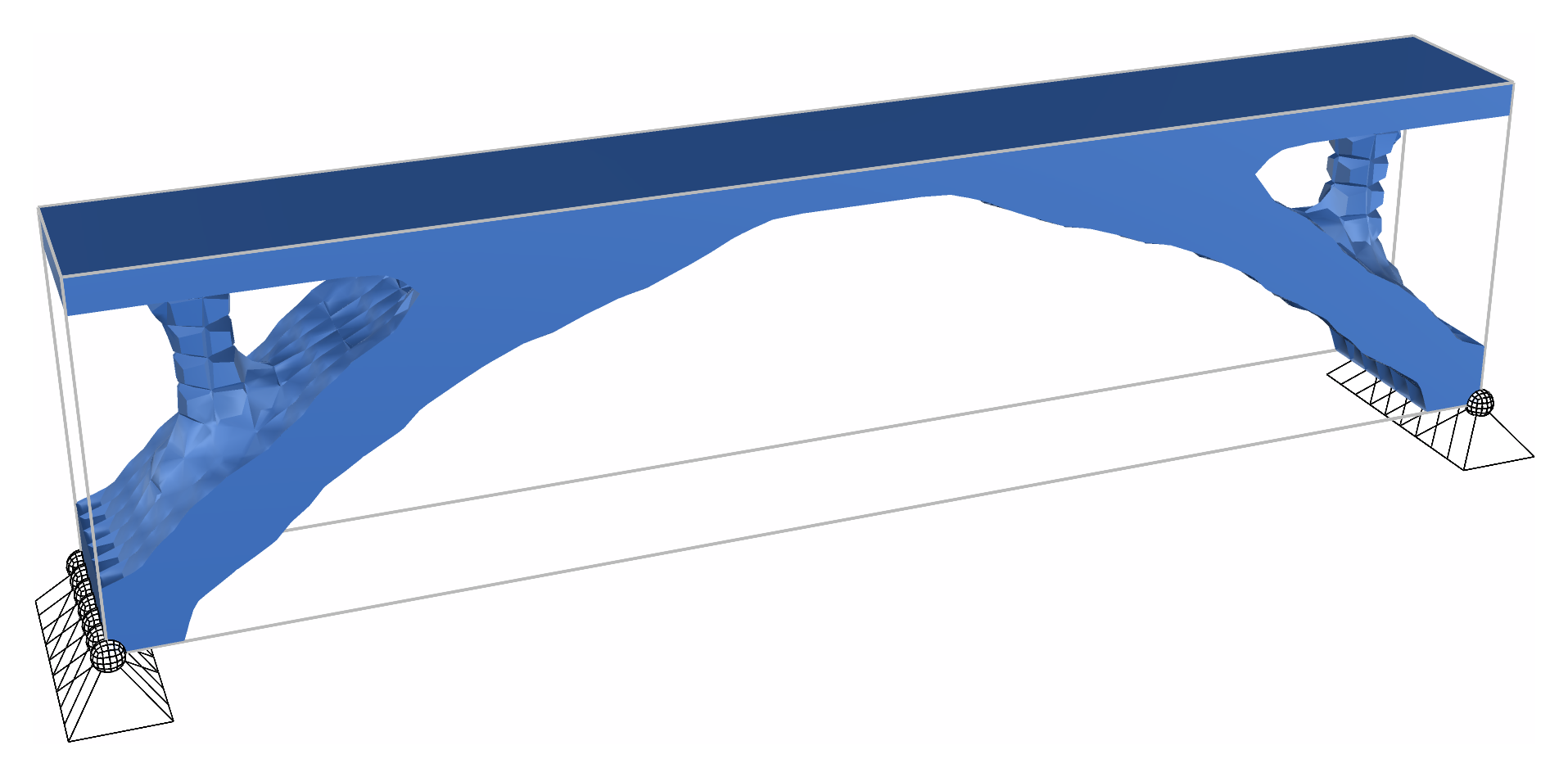
The bridge example: what 20% of a 16 x 2 x 4 m block under a solid deck keeps.
🔧 Grasshopper component
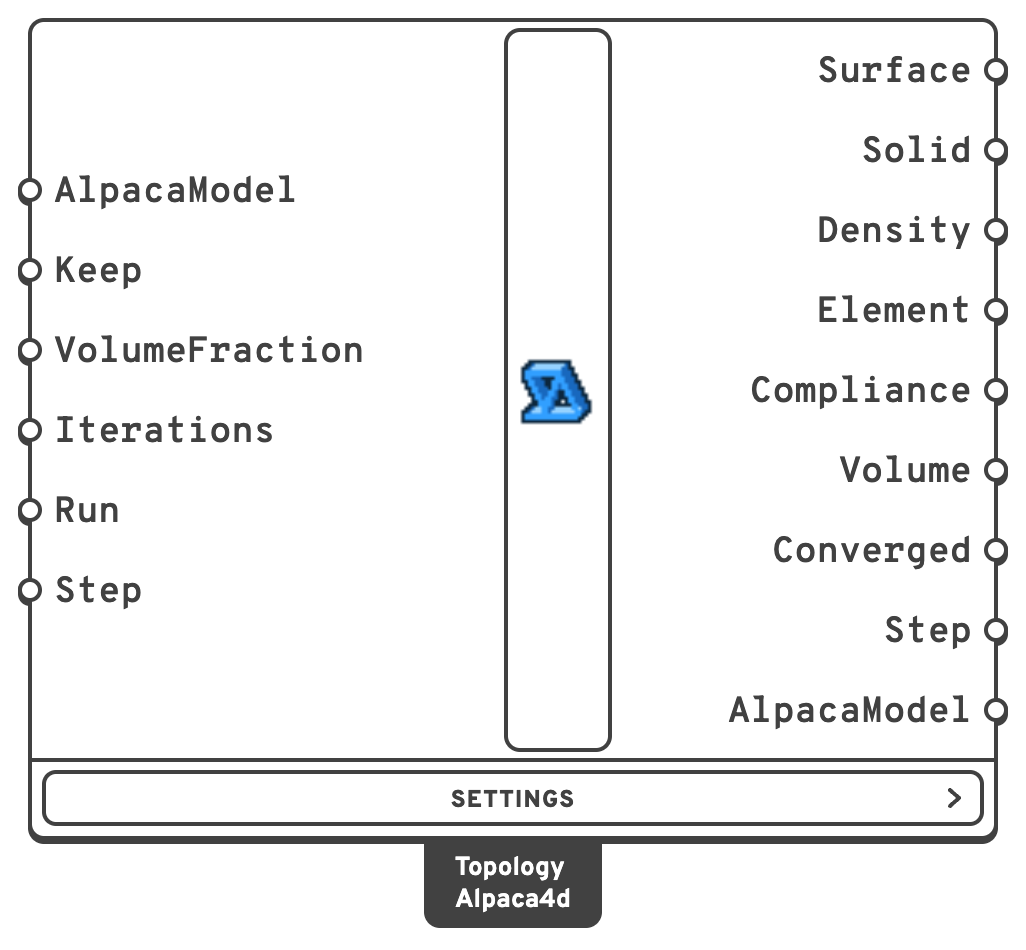
KeepSolids to keep solid whatever the optimisation finds, by ElementId, tag or pattern, as the result components' ElementId input takes them.
VolumeFractionThe share of the designed solids' volume to keep.
IterationsHow many iterations at most, counted from the first.
true runs the optimisation, false pauses it.StepWhich iteration's design Surface, Solid, Density and AlpacaModel show: 0 the one the run starts from, 1 after the first iteration, and so on.
In the Settings menu:
| Input | Default | Description |
|---|---|---|
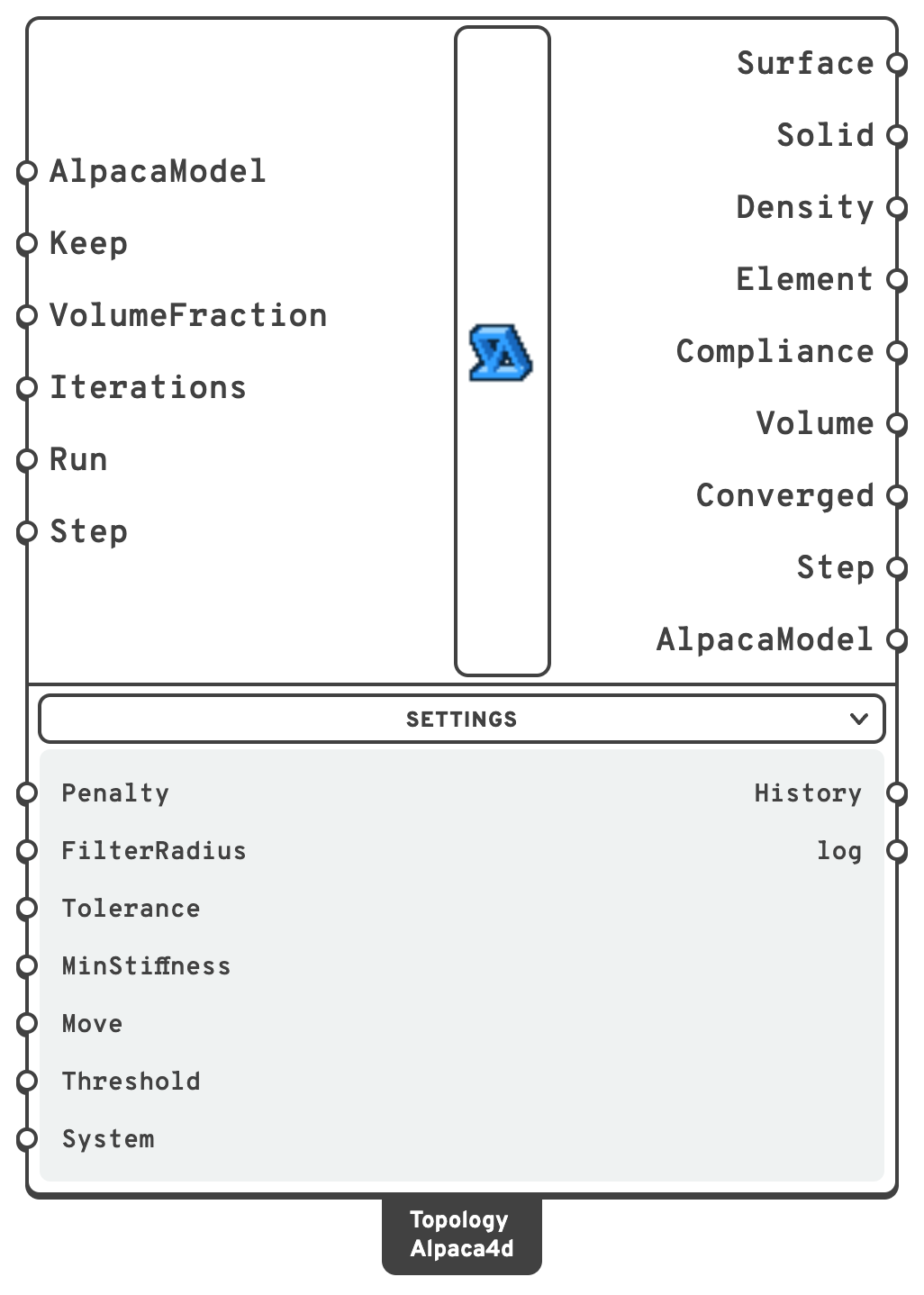
| Penalty | 3 | The SIMP penalty p: an element of density x has x^p of its stiffness. 3 pushes the result to solid or void. |
| FilterRadius | 1.5 elements | How far each element's density is averaged over, in model units: about the thinnest member the result can have. |
| Tolerance | 0.01 | The run stops when no density changes by more than this in an iteration. Made smaller after a run, the run goes on from where it stopped. |
| MinStiffness | 1e-9 | The stiffness a void element keeps, as a share of the solid's. |
| Move | 0.2 | The most a density can change in one iteration. |
| Threshold | 0.5 | The density from which an element counts as solid, for Surface, Solid and AlpacaModel. It changes nothing in the run. |
| System | Auto | The system of equations, as in Analysis Settings: Mumps on every core when the OpenSees has it, BandSPD when not. |
SurfaceThe outline of the material kept: one closed mesh through where the density crosses Threshold, capped where it meets the edge of the domain.
SolidThe solids that make the design, as new copies of the model's: those at or above Threshold, without pieces nothing holds, and with the elements that join a member's steps.
true when the run ended because the densities stopped moving.It takes the assembled model and works on its solids. Each solid gets a density between 0 and 1, and a stiffness of density³ times its material's: SIMP, the method of top3d and of most topology optimisation codes. Each iteration analyses the model, works out from every element's strain energy how much stiffness its material buys, and moves material from where it does little to where it does most, keeping the volume. A density filter averages each element with its neighbours, so that the result is members rather than a checkerboard.
Nothing is ever cut out of the mesh. An element that loses its material keeps a billionth of its stiffness, so the model keeps all its nodes and connections, and the analysis never meets a loose part.
Which elements
| Element | Solved as |
|---|---|
| SSP Brick | OpenSees' eight point brick (stdBrick), on the same nodes. An SSP Brick works out part of its stiffness once, when it is built, from the modulus it starts with, so it cannot be softened afterwards. The eight point brick is also the brick top3d optimises with. |
| Ten Node Tetrahedron | Itself. Needs an OpenSees from the master branch since 16 October 2026, as Run Analysis does. |
Every solid needs an Elastic Isotropic material: its modulus is what is scaled. Beams, trusses, shells and links in the model are analysed with the solids but take no part: they keep their full stiffness, their strain energy is not in Compliance, and the component warns that they are there.
Three ways
Alpaca4d has three components that find where a solid needs its material. They take the same model and run the same way, with Run, Iterations and Step, and share their main outputs - Surface, Solid, Step, AlpacaModel. Multi-Material Topology also takes the materials and a volume for each, and gives a surface per material.
| Topology Optimisation | BESO Topology | Multi-Material Topology | |
|---|---|---|---|
| Finds | Where one material goes | Where one material goes | Where each of several materials goes |
| Each element | A density between 0 and 1; Threshold decides what counts as solid | Solid or void, all along | A density of every material, pushed to one material alone or void |
| Update | Optimality criteria, as top3d | The elements that work hardest are kept, the rest let go | MMA, with a volume limit per material |
| A run | One design for VolumeFraction; the quickest on small models | From the whole block down to VolumeFraction: Step shows the design of every volume on the way; about 100 iterations, the quickest on large models | About 260 iterations, each a quarter longer: four to seven times as long as the quicker of the other two |
How long it takes compares them.
▶️ Running it
- Model the design domain in SSP Bricks - Mesh Series to Brick turns a series of meshes into bricks - or in Ten Node Tetrahedra.
- Give anything that must stay an ElementId, and name it in Keep.
- Support and load the model as for an analysis, and assemble it.
- Set Run to
true.
The run goes on its own thread, so Rhino stays free. About once a second the component solves again with the design reached so far: Surface and the other outputs follow the run, and the component shows the iteration it is on. One OpenSees stays open for the whole run, so the model is built once, not once per iteration.
Pausing and going on
A run that stops before it has settled can go on from where it stopped:
| You | The run |
|---|---|
Set Run to false | Pauses after the iteration under way, and keeps the design it has reached. |
Set Run to true again | Goes on from there. |
| Raise Iterations - 200 to 500, say - after a run stopped at 200 | Goes on from iteration 201. While it runs, it just goes further. |
| Lower Tolerance after a run that settled | Goes on from where it settled. |
| Lower Iterations below what has run | Starts again from the beginning: the design after fewer iterations is not kept. |
| Change anything else - the model, Keep, VolumeFraction, a setting | Starts again from the beginning. |
Going on gives exactly what one run of all the iterations gives: the optimisation carries nothing from one iteration to the next but the densities, and those are kept.
Watching the run again
Every iteration's design is kept, so a slider on Step plays the run back: from the uniform block it starts as, through the first rough members, to the design it settles on. Left empty, or at its end, Step shows the latest design, live while the run goes.
The designs are kept small: a density as a byte - steps of 0.004, finer than any surface drawn from it can show - and each design stored as its change from the one before, which is nearly nothing once a run settles, compressed. The 200 designs of the cantilever below take 92 KB, 82 times less than as numbers, and any one of them is back in a fraction of a millisecond.
Note
Keep material round supports and loads. A support or a load on a single row of nodes asks for material there and nowhere around it: give the elements round them an ElementId and keep them, so the result does not hang on a few elements.
Warning
Self-weight stays as it was. Gravity Load turns the weight of every element into loads on its nodes once, when the model is assembled, so an element the optimisation empties still weighs what it did. The component warns when the model has Gravity. Leave it out to optimise for the other loads.
Without a license, Topology Optimisation runs on models of up to 500 elements, counting any beams, shells and links with the solids. The design it finds, its AlpacaModel output, is analysed, and drawn by Model View, without a license up to the same 500, although other models stop at 50. A larger model needs one: see License.
How long it takes
On an Apple M2 Pro, with Mumps:
| Bricks | Unknowns | Per iteration | 100 iterations |
|---|---|---|---|
| 3 456 | 13 400 | 0.17 s | 17 s |
| 4 800 | 19 200 | 0.23 s | 23 s |
| 9 600 | 38 100 | 0.46 s | 46 s |
| 19 200 | 67 800 | 1.0 s | 100 s |
The three topology components side by side, on the block of the Topology Bridge, one run at a time on the same machine, each keeping a fifth of the block below the deck - Multi-Material Topology 5% in steel and 15% in concrete:
| Bricks | Topology Optimisation | BESO Topology | Multi-Material Topology |
|---|---|---|---|
| 1 024 | 2.6 s, 44 iterations | 4.9 s, 92 iterations | 19 s, 267 iterations |
| 3 456 | 13 s, 77 | 17 s, 102 | 59 s, 263 |
| 8 192 | 49 s, 109 | 36 s, 90 | 2 min 21 s, 260 |
| 16 000 | 1 min 48 s, 123 | 1 min 18 s, 95 | 4 min 53 s, 260 |
An analysis takes as long whichever component asks for it, so the difference is in how many iterations each makes, and in the update: Multi-Material Topology's, MMA, takes about a quarter of its time, the other two's next to nothing. Topology Optimisation's compliance is within 1% of where it ends after about 30 iterations at every size; the rest of its run settles the densities. BESO Topology comes down 2% of the volume an iteration, so its design is there only near the end. Multi-Material Topology sharpens its projection every 50 iterations up to the 251st, so a run is never much shorter than 260.
🔍 Analysing the design
Once the run has stopped, AlpacaModel is the design as a model of its own: wire it to Run Analysis and read it as any analysed model, with Model View, Nodal Displacements or the other result components. Three things happen on the way from the densities to a model:
- Solid or void. The elements at or above Threshold are solid, at their material's full stiffness. The others are left out of the model, rather than kept at a billionth of it.
- Pieces nothing holds are left out. Solid elements make one piece where they share a face. A piece the supports on its nodes do not hold still - every translation and rotation stopped - is left out: the bits the optimisation leaves floating carry nothing, and an analysis would find them free to move. A piece that touches a beam or a shell is kept, as the beam may hold it.
- Steps are joined. On a coarse mesh a diagonal member one or two elements thick comes out as a staircase, its steps meeting only along edges, where it would hinge. The material the filter spread between the steps is there, just under Threshold: where two pieces meet only along an edge or at a corner, the denser of the elements that join them face to face is made solid too.
Solid holds the same elements, and Surface outlines them. Where a thin member fades out around Threshold, the surface through the averaged densities can break into crumbs, apart from the rest though the member's elements are joined to it: Surface leaves out pieces under a hundredth of the largest. The component says how many elements it left out or added, and how many crumbs.
Supports that stand where the design is void are left out of the model: the cantilever below is held all over its end, and the design opens a gap in the middle of it. A load that stands on void is left out too, with a warning, as the model no longer carries every load the design was made for: keep the solids under the loads.
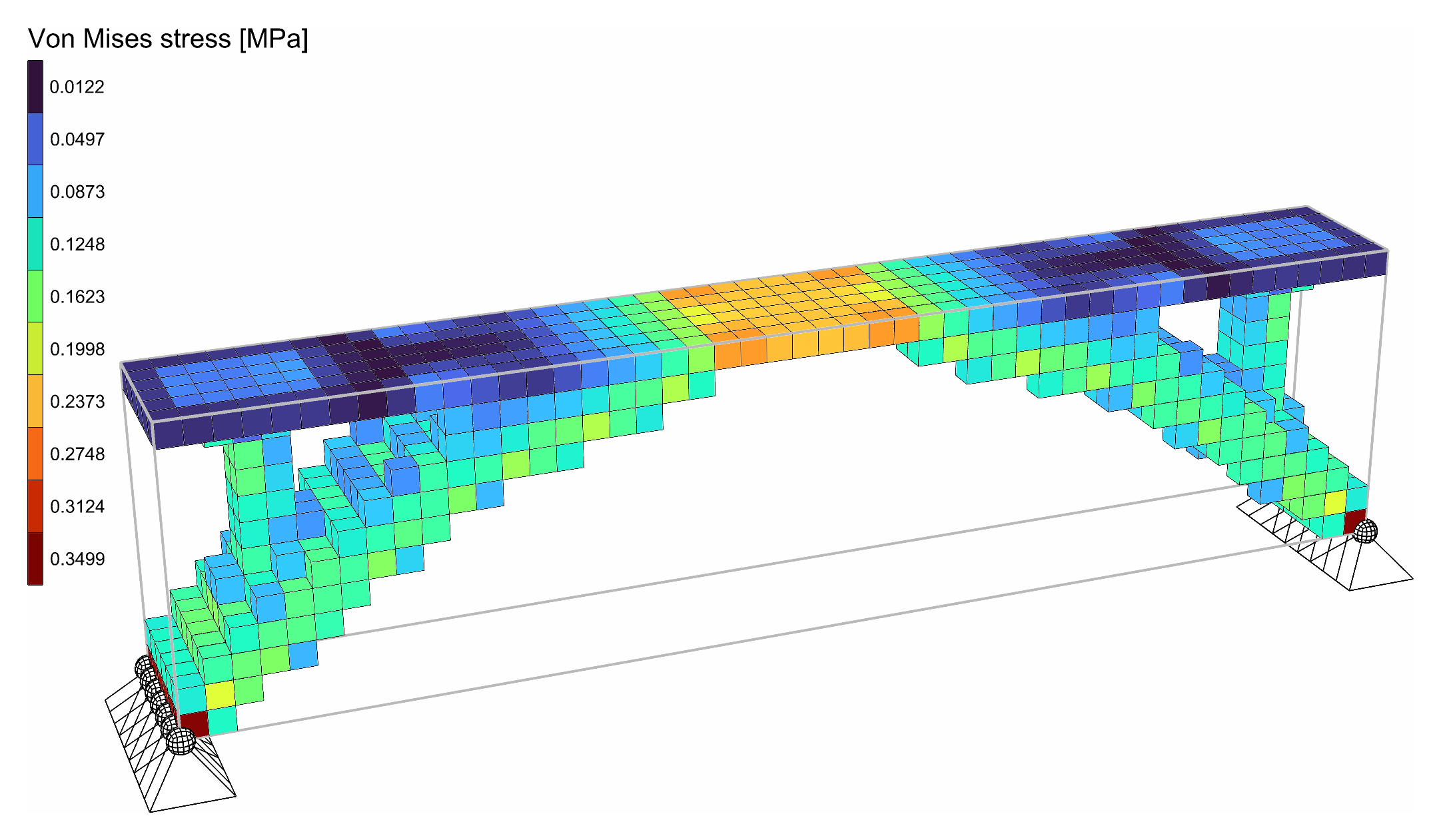
The bridge's design, analysed: its Von Mises stresses.
Solid and void, the design comes out a little stiffer than the optimiser's last compliance says, by about a quarter on the benchmarks below: the grey elements it keeps get their full stiffness.
Note
Copies. Solid and AlpacaModel hand out new copies of the model's solids. Assembling the model's own again would renumber them under the run.
🧪 Benchmarks
Two problems run with Alpaca4d and OpenSees, and with top3d itself - a numpy port of Liu and Tovar's code (An efficient 3D topology optimization code written in Matlab, 2014), with its own brick, assembly and solver. Both use top3d's settings: 30% of the volume, penalty 3, a filter of 1.5 elements, unit modulus and loads.
Cantilever
top3d's own problem, top3d(60,20,4,0.3,3,1.5): 60 x 20 x 4 bricks, held at one end, loaded at the bottom of the other.
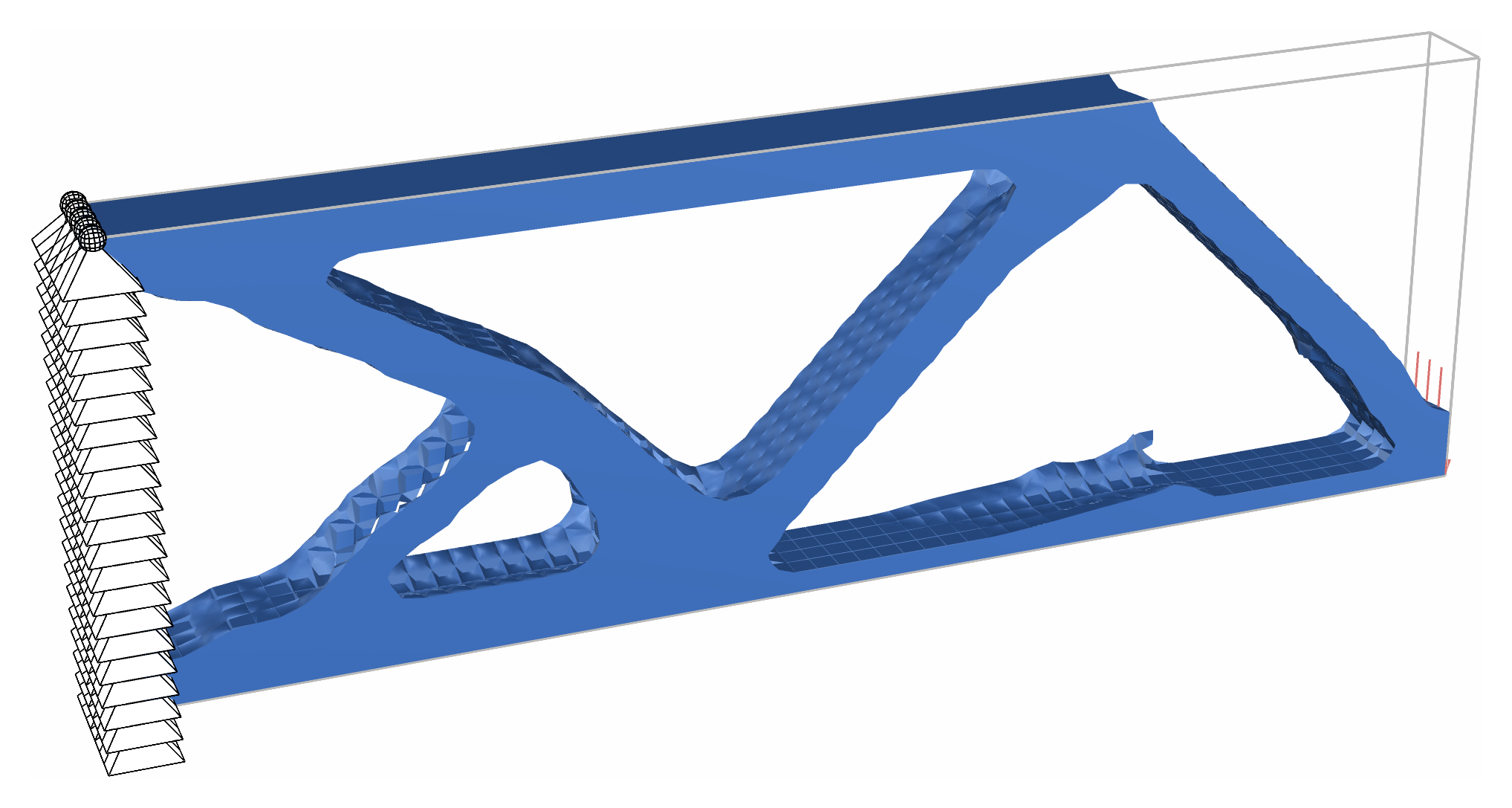
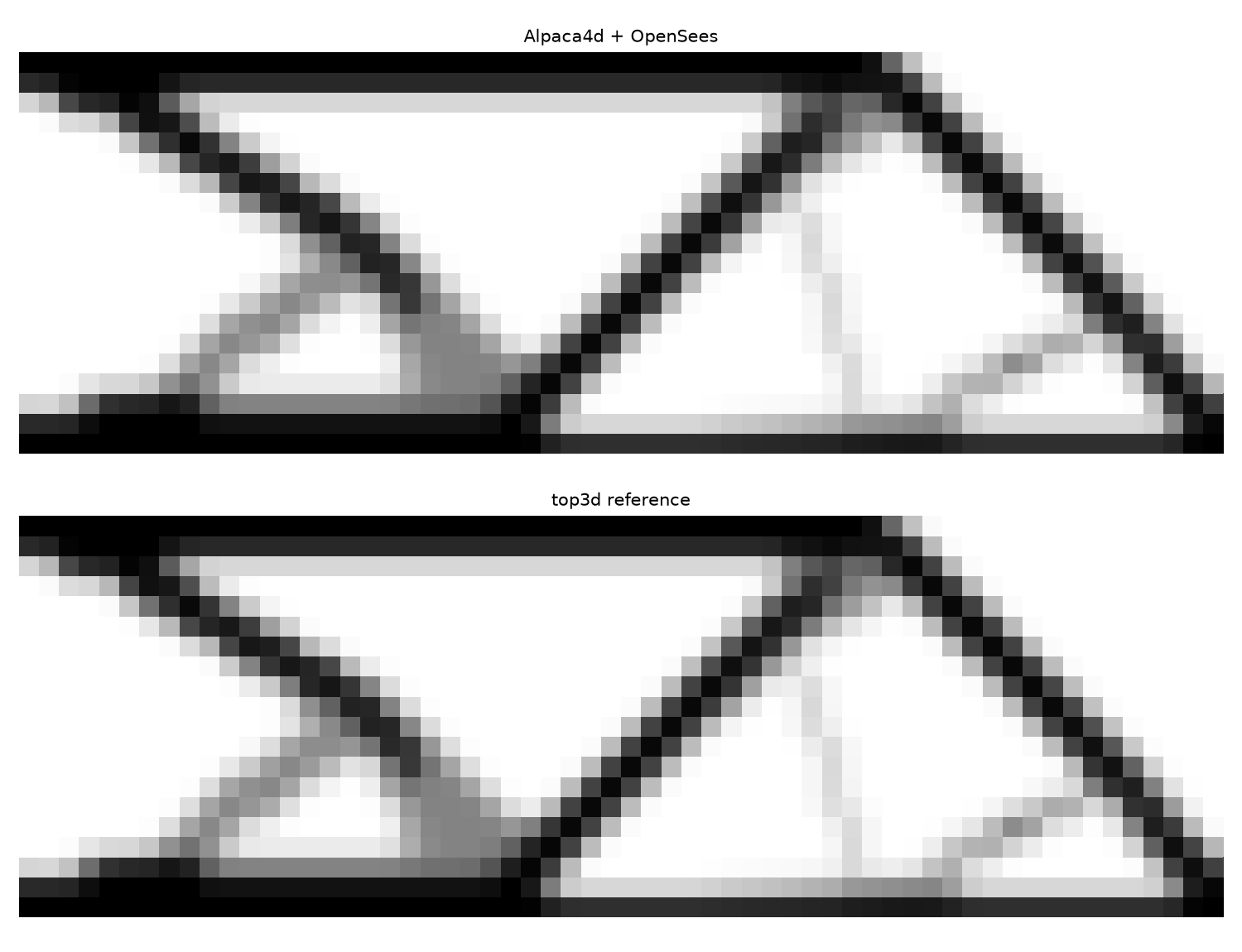
The density through the depth, by Alpaca4d (top) and top3d (bottom).
Simply supported beam
120 x 20 x 4 bricks, pinned along the bottom of one end and on rollers along the other, loaded at the top in the middle.
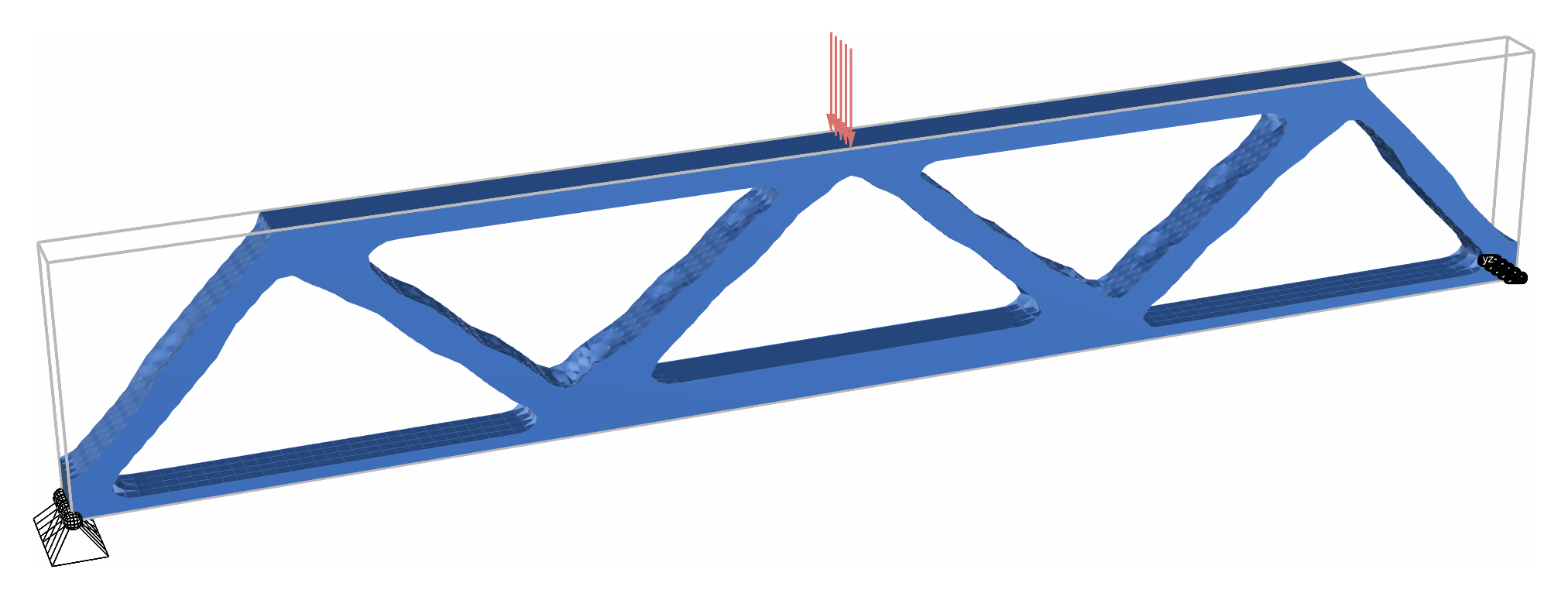
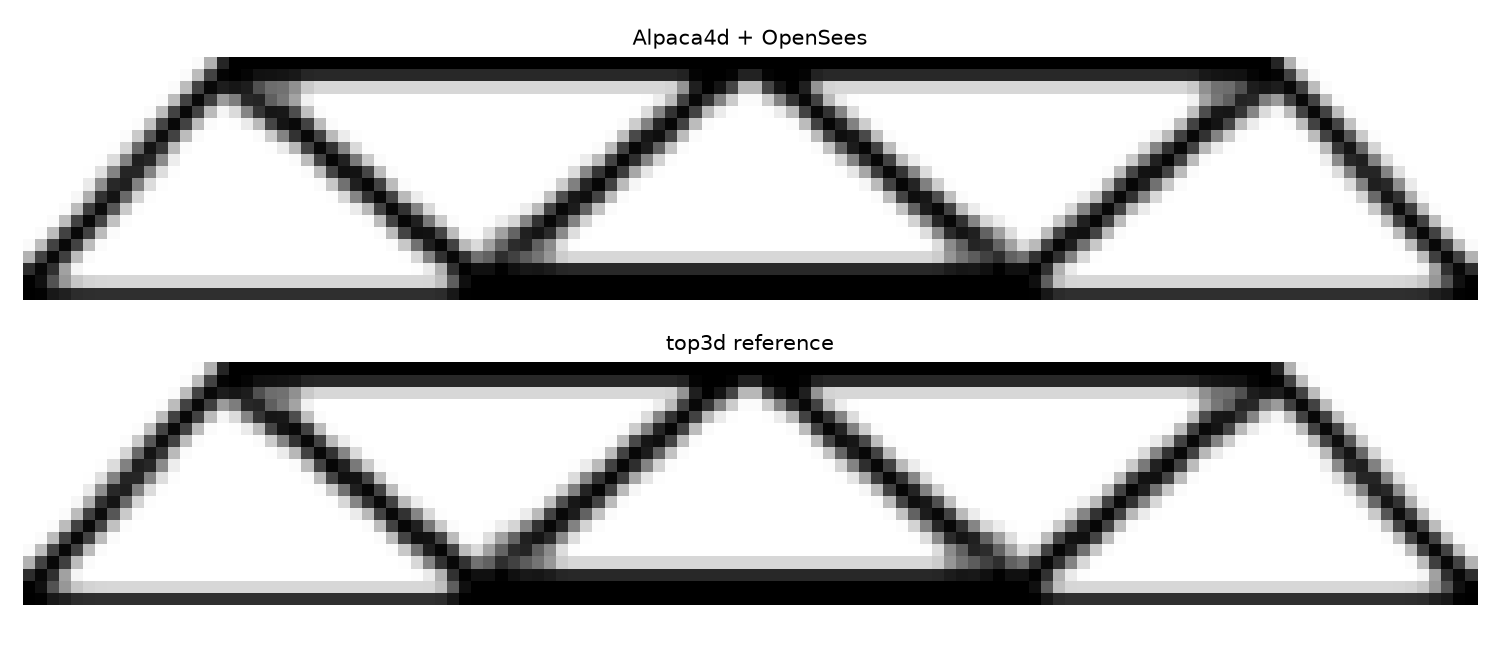
The density through the depth, by Alpaca4d (top) and top3d (bottom).
The numbers
| Cantilever | Simply supported | |
|---|---|---|
| Bricks | 4 800 | 9 600 |
| First compliance, Alpaca4d against top3d | 7.7e-12 apart | 5.9e-12 apart |
| Compliance after 200 iterations | 2415.86 / 2415.82 | 1203.0263 / 1203.0263 |
| Densities after 200 iterations | 4.5e-4 apart on average | 8.1e-5 apart at most |
The first analyses agree to round-off: OpenSees' eight point brick is top3d's brick. The runs then follow each other: the simply supported beam to 2e-8 all the way, and the cantilever to within 0.2% while its design rearranges itself, around iteration 70, before both come out at the same design. The checks and the reference are in Alpaca4d.Test/TopologyOptimisation in the Alpaca4d repository.
To run both in Grasshopper, download the Topology Benchmarks example: each problem has its own Run toggle, and panels beside it give the compliance to expect after 200 iterations.
Example
The Topology Bridge example is a steel block 16 m long, 2 m wide and 4 m high, pinned along both ends of its bottom. Its top layer is a deck, kept solid through Keep, carrying 10 kN/m². With 20% of the rest, the optimisation finds an arch from support to support that rises into the deck at mid-span, with a column up to the deck near each end - 3 456 bricks, 77 iterations, 14 seconds. At two bricks per metre the deck is a 0.5 m slab of solid steel, stiff enough to span most of the way itself, and the steel goes into two legs that shorten its span instead: what is best depends on what is already there. Its last group analyses the design from AlpacaModel once the run has stopped, as in the picture above.
The Truss Node and the Beam-Column Joint examples find a node where members meet in space - nine members of a space truss, a column and four beams - with all three topology optimisations side by side.
📚 References
- M. P. Bendsøe (1989). Optimal shape design as a material distribution problem. Structural Optimization 1:193–202. — SIMP.
- M. P. Bendsøe, O. Sigmund (1999). Material interpolation schemes in topology optimization. Archive of Applied Mechanics 69:635–654.
- O. Sigmund (2001). A 99 line topology optimization code written in Matlab. Structural and Multidisciplinary Optimization 21:120–127.
- T. E. Bruns, D. A. Tortorelli (2001). Topology optimization of non-linear elastic structures and compliant mechanisms. Computer Methods in Applied Mechanics and Engineering 190:3443–3459. — the density filter.
- B. Bourdin (2001). Filters in topology optimization. International Journal for Numerical Methods in Engineering 50:2143–2158.
- E. Andreassen, A. Clausen, M. Schevenels, B. S. Lazarov, O. Sigmund (2011). Efficient topology optimization in MATLAB using 88 lines of code. Structural and Multidisciplinary Optimization 43:1–16. — the stiffness of a void element, Emin, and the update as coded.
- K. Liu, A. Tovar (2014). An efficient 3D topology optimization code written in Matlab. Structural and Multidisciplinary Optimization 50:1175–1196. — top3d, which Topology Optimisation follows step for step.
Alpaca4d adds to top3d what a model drawn in Grasshopper needs: elements of different sizes count by their volume, in the filter and in the volume kept; solids can be kept solid; and the element energies come from OpenSees' own element forces, so any solid it solves can be optimised.