
Find the load factor a model buckles at
Linear Buckling Analysis finds what the loads must be multiplied by for the model to buckle, lowest first, and the shape it buckles into for each. The first factor is the critical load factor
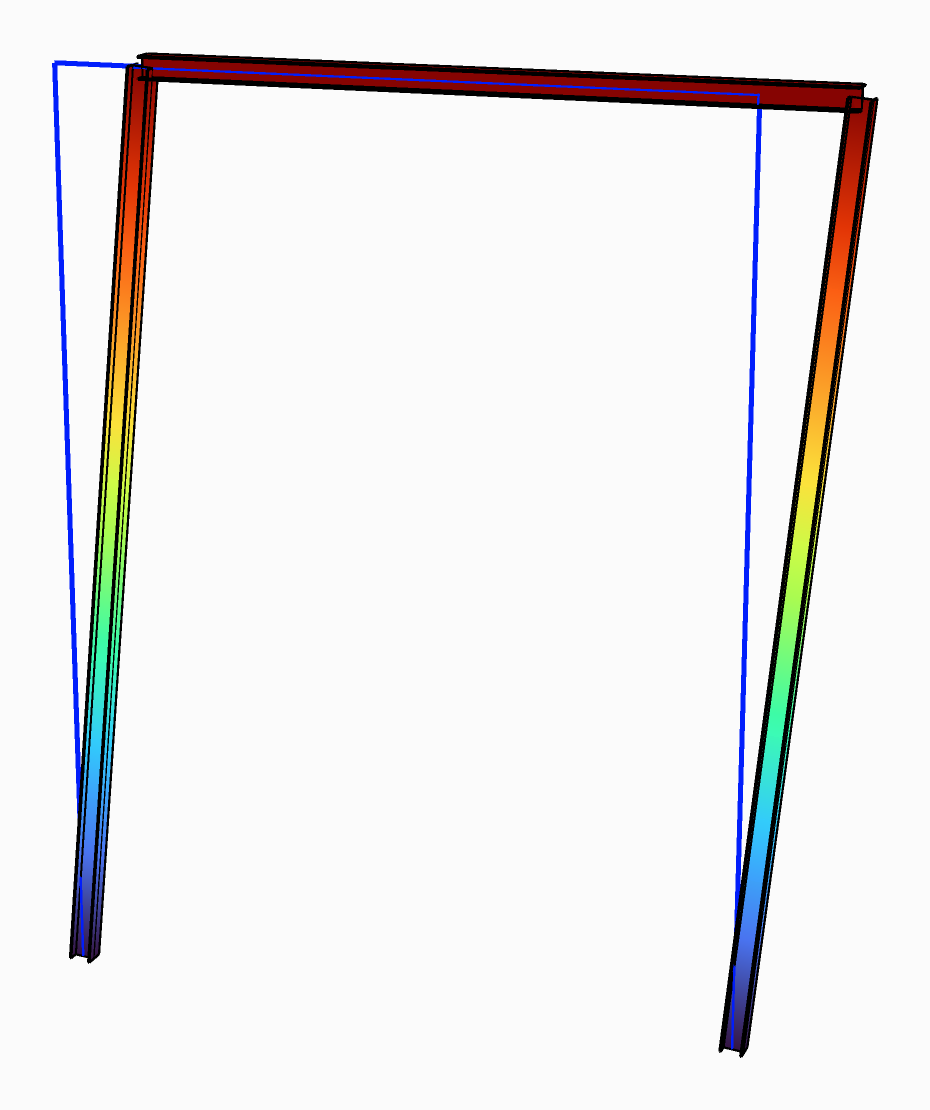
The frame's first buckling mode, at a load factor of 1.24, over the frame at rest.
You need
- An assembled model from Assemble, with the loads to buckle it under in its load patterns.
- Beams, shells or solids. Solids buckle too: Alpaca4d adds their geometric stiffness.
Steps
- Wire the model from Assemble into the AlpacaModel input of Linear Buckling Analysis (Alpaca4d ▸ 07_Analysis). It needs no Analysis Settings.
- Set Buckling Modes to the number of modes you want. The default is
1. - Set Divisions.
1leaves the beams whole, which is enough for the sway of a frame. A member that buckles on its own, between its ends, needs4or more. - Plug Load Factors into a panel. The first is
: the loads times are the loads at which the model first becomes unstable. - Wire its AlpacaModel output into Model View, with a slider on Step,
0the first mode. In the Results menu tick Deformed shape, and Animate to see the mode move.
Check
- A first factor below 1 gives a warning: The first load factor is …: the model buckles before its loads are reached.
- Nothing buckles under these loads means that no member is compressed by them. Look at the loads with Show Loads in Model View.
- Double Divisions. Once the first factor changes little, the beams are split finely enough: with 4 elements to a half wave of the buckled shape it is about 5 % too high, with 8 about 1.3 %.
Good to know
- EN 1993-1-1 5.2.1 lets a first-order analysis stand when
for an elastic analysis, 15 for a plastic one. - A member buckles at
, so its buckling length is . Give it to LengthY or LengthZ of Utilisation. - The analysis is linear and elastic, and beams buckle in bending only.
is not the load the structure can carry, and lateral-torsional buckling is Utilisation's to check. - On OpenSees 3.8.0 a model can have at most 4000 equations, about 650 beam or shell nodes. A newer build has no such limit.
See also
- Linear Buckling Analysis — what it solves, Divisions, limits and messages
- Model View — drawing a mode, and Animate
- Check steel members to EN 1993-1-1 — buckling lengths in a member check