
Natural Vibration
Solves the eigenvalue problem and returns the modes, periods and frequencies of the structure. It is the first analysis worth running on any new model: the first period tells you immediately whether the stiffness and the mass are roughly right.
🔧 Grasshopper component
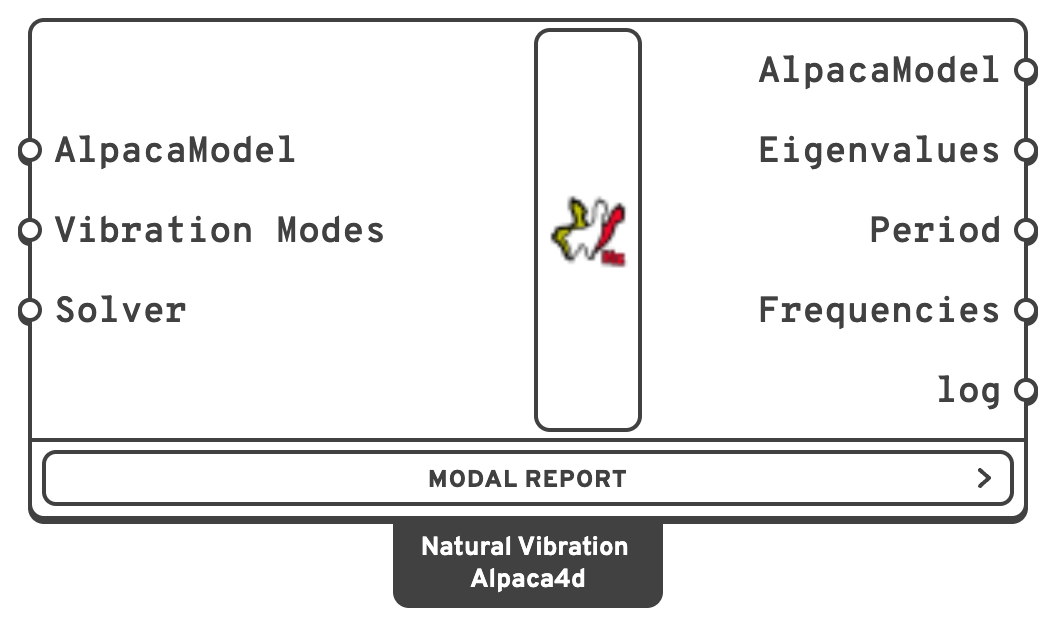
AlpacaModelThe assembled model, from Assemble, or an analysed one, from Run Analysis, Section Optimiser or Linear Buckling.
SolverEigen solver: -genBandArpack or -fullGenLapack.
AlpacaModelThe model with mode shapes attached, each scaled so that its largest translation is 1.
s.Hz.Note
A mode has no size of its own. OpenSees scales each mode to a modal mass of one, φᵀMφ = 1, so the heavier the model, the smaller the mode: a building of a few thousand tonnes moved a few centimetres and needed a deformation scale in the hundreds. Alpaca4d reads each mode with its largest translation 1, as Linear Buckling does its buckling modes, and Model View draws it at Deformation scale 1 with its largest movement 8 % of the model's diagonal, whatever the model's size or mass. The slider runs from −2 to 2 there, so Animate swings the mode through its rest and out the other side.
No Analysis Settings are needed — an eigenvalue problem has nothing to converge.
After an analysis
An analysed model can be connected too. Its modes are those of the model it was analysed from: the analysis it went through keeps that model, and Natural Vibration solves it instead of the analysed one, whose script ends in wipe.
- From Section Optimiser, they are the modes of its last design. There is no need to put beams on its Section output and assemble them again.
- From Linear Buckling, the beams are whole again, as they were assembled, whatever Divisions split them into.
- From Run Analysis, they are the modes of the model unloaded. The displacements and forces the analysis found do not change them: there is no stiffening or softening under load.
Modal Report
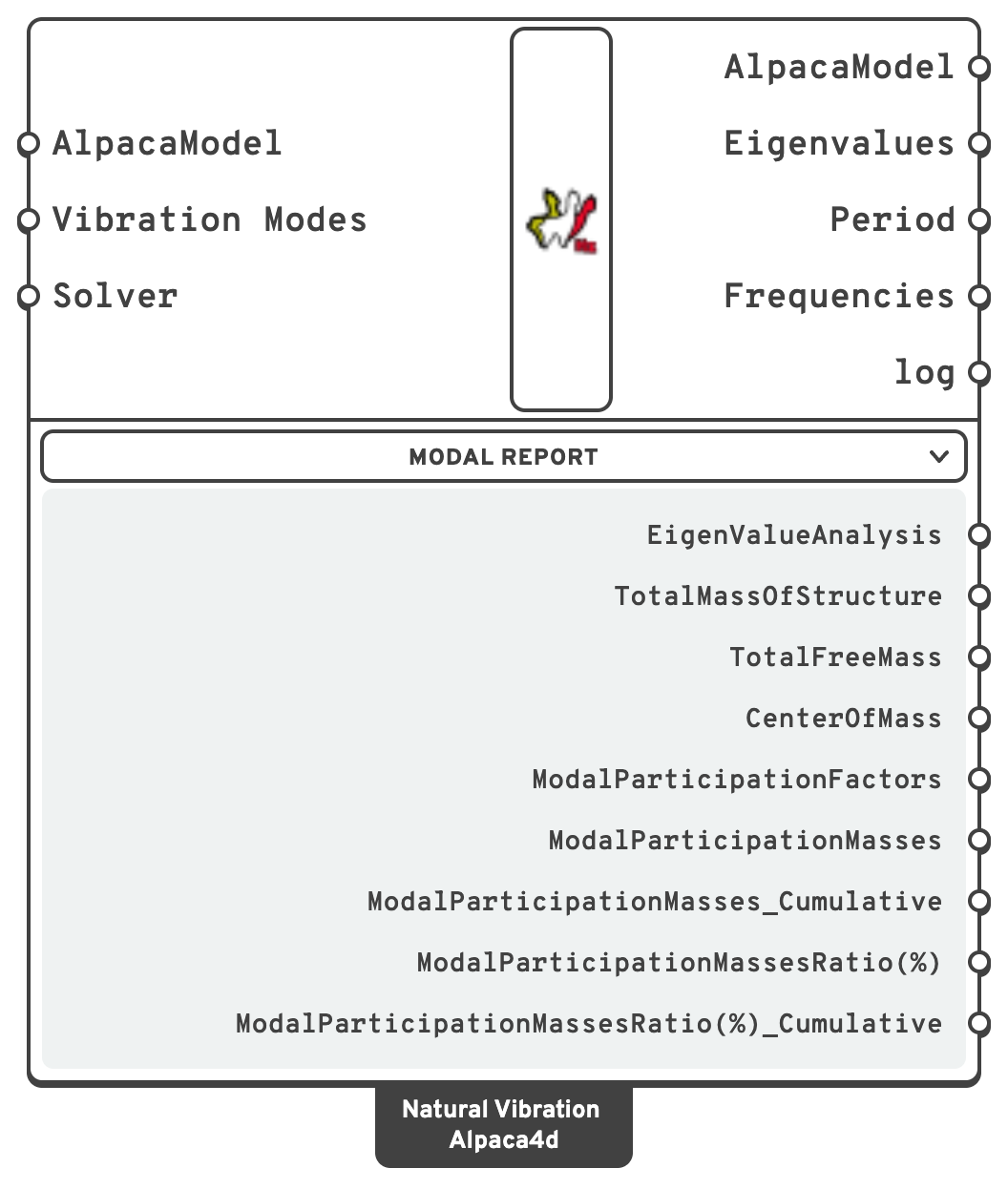
The modal properties OpenSees writes after the eigenvalue run — masses, centre of mass, participation factors and participation mass ratios — are outputs too, in the Modal Report menu under the component. The menu starts folded; click it to show them. A wire from one of them keeps working with the menu folded.
Each output is one section of the report, as lines of text: plug it into a Panel to read it.
| Name | Description |
|---|---|
| EigenValueAnalysis | Eigenvalue, frequency, period per mode. |
| TotalMassOfStructure | Total mass, all six directions. |
| TotalFreeMass | Mass on unrestrained DOFs — the mass that can actually participate. |
| CenterOfMass | Coordinates of the centre of mass. |
| ModalParticipationFactors | Participation factor per mode and direction. |
| ModalParticipationMasses | Participating mass per mode and direction. |
| ModalParticipationMasses_Cumulative | Running total down the modes. |
| ModalParticipationMassesRatio(%) | Participating mass as a percentage of the total. |
| ModalParticipationMassesRatio(%)_Cumulative | Running total of the percentages. Most codes ask for 90 % of the mass in each direction: read it here, and raise Vibration Modes until you get there. |
TotalMassOfStructure is also the quickest check of the model's mass against a hand calculation — it catches a missing density or a mis-scaled Mass Point. CenterOfMass places a Rigid Diaphragm master node, or estimates a torsional eccentricity.
Note
Definitions made before the Modal Report menu open with the previous Natural Vibration component, which still works but has no report outputs. Grasshopper's Solution ▸ Upgrade Components swaps it for the current one and keeps every wire — the inputs are the same, and each output's wires follow it by name, so the log, which used to be the first output and is now after Frequencies, keeps its wires too. A Modal Analysis Report wired to it keeps working; its outputs are the menu's, under the same names.
The solvers
| Solver | Use |
|---|---|
-genBandArpack | The default. Iterative, and the right choice when you want a few modes out of a large model. |
-fullGenLapack | Direct, forms the full matrices. Extracts all modes, but only viable on small models. |
OpenSees's third, -symmBandLapack, solves only the standard eigenvalue problem — the stiffness without the mass — so it cannot give natural frequencies, and the component stops with an error if it is typed in.
-genBandArpack does its solves with a linear system solver, which the component picks the way Analysis Settings does with Auto. It uses Mumps, on every core, when the OpenSees in use has it (see Setup), and BandSPD when it does not. Left to itself, OpenSees would fall back on ProfileSPD, which is much slower on a large model. For 10 modes on an Apple M2 Pro:
| Model | DOF | OpenSees' default, ProfileSPD | Mumps |
|---|---|---|---|
| Frame 15 × 15 × 15 bays | 23 040 | 7.8 s | 0.47 s |
| Shell 120 × 120 | 84 966 | 38 s | 1.4 s |
| Brick block 24 × 24 × 24 | 45 000 | 205 s | 2.1 s |
The eigenvalues are the same with every one of them.
Warning
Save the Grasshopper file first. This component writes its deck, recorder_eigen and ModalReport files into the AlpacaResults folder beside it, named as Run Analysis names its own, and throws "Have you saved the Grasshopper script?" if there is nowhere to put them.
📈 When to use it
Use it when
- You have just built a model and want to sanity-check it. A first period far from expectation means the mass or the stiffness is wrong, and finding out now is cheap.
- You need frequencies to calibrate Damping.
- You need modal masses and participation factors for a response-spectrum check → open the Modal Report menu.
Do not use it when you want displacements or forces under load → those need Run Analysis.
Note
A model with no mass has no modes. Mass comes from the material density through the section, and from Mass Point. A Gravity Load does not create mass — it creates force.
The Steel Tower example gives a lattice tower's first six modes beside its analysis under wind, and draws the first. The Natural Vibration example finds a concrete tank's first hundred modes and draws them all at once, a Series of steps into Model View, each mode on its own copy of the tank on a grid; and Response Spectrum from Sticks takes the period of each of thirty models, one a branch, to damp each at its own frequency.
🔗 Relation to OpenSees
recorder mpco recorder_eigen.mpco ...
if {[catch {system Mumps -matrixType 1 -numThreads 0}]} {
    puts stderr "Alpaca4d: this OpenSees has no Mumps solver, so BandSPD solves, on one core"
    system BandSPD
}
set lambdaN [eigen -genBandArpack $numModes]
puts "$lambdaN"
modalProperties -file "ModalReport.txt" -unorm
record
wipe
The eigenvalues are parsed back from the console output; the modal properties are read from ModalReport.txt into the Modal Report outputs.