
Hold a node with a support
Fix, pin or roll a node, turn its support to a sloping plane, or hold it on springs or on a bearing that can lift. One Support component does all of these.
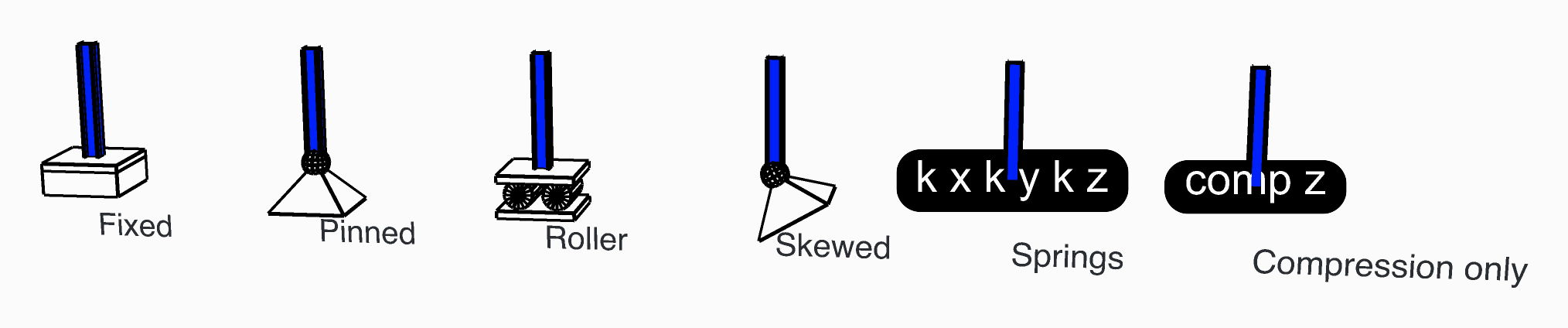
Six columns, each held another way at its foot.
You need
- A point on a node of the model: the end of a beam, a vertex of a shell's mesh, a node of a solid.
- Assemble, whose Supports input takes the supports.
Steps
Place a Support and wire the point into Position.
Pick the type in its Support Type menu: Rigid (the default), Elastic or Compression Only.
Rigid: Tx to Rz are all
true, held, to start with. Set tofalsewhat the node is free to do:Support Set to falseFixed nothing Pinned Rx, Ry, Rz Roller sliding in X (preset Sliding in X + Rz restraint) Tx, Rx, Ry Roller sliding in X and Y (preset Sliding in X and Y + Rz restraint) Tx, Ty, Rx, Ry Skewed: wire a Plane into Position instead of a point. The six directions are then the plane's own axes. For a roller on a sloping face, give a plane whose Z axis is square to the face, hold Tz and set Tx and Ty to
false.Elastic: give a stiffness for each direction the springs hold: Kx, Ky, Kz in
kN/m, Krx, Kry, Krz inkNm/rad. Left empty, or zero, the node is free that way. Give at least one, or the component warns.Compression Only: it holds along the plane's Z only while the node moves against Z: down, for a point. Leave Stiffness empty for a rigid bearing, or give one in
kN/m. Gap, inm, is how far the node moves before the support takes hold. Analyse it with the Newton algorithm in Analysis Settings, in several steps.
Check
- In Model View, tick Show Supports in the Supports menu. The seven presets of the Support page get their own symbol; any other support, springs included, a text tag listing what it holds.
- After the analysis, Reaction Forces gives each support's reactions in its own axes. A released direction reads zero, and the vertical reactions add up to the load.
Good to know
- A support takes hold only within Assemble's Tolerance of a node. Two supports on one node are merged into one, with a remark, unless one of them is skewed or a spring.
- A spring support holds nothing it has no spring for. For a pinned bearing that can lift, put a Compression Only support and a Rigid one holding only Tx and Ty on the same point. Do not let the two act along the same direction: Assemble warns when they do.
- Turn the plane over for a Compression Only support that holds only in tension.
- A Compression Only support lets go only in a non-linear analysis. The component says so in a remark, and Run Analysis warns when the algorithm is
Linear.
See also
- Support — every input, the seven presets, and what it writes for OpenSees
- Reaction Forces — what each support carries
- Assemble — two supports on one node
- Spring Link — a spring between two parts of the model rather than to the ground