
Find natural frequencies and mode shapes
Natural Vibration finds the modes of a structure, with their periods and frequencies, and Model View shows each mode move. Run it first on a new model: a first period far from what you expect means the mass or the stiffness is wrong.
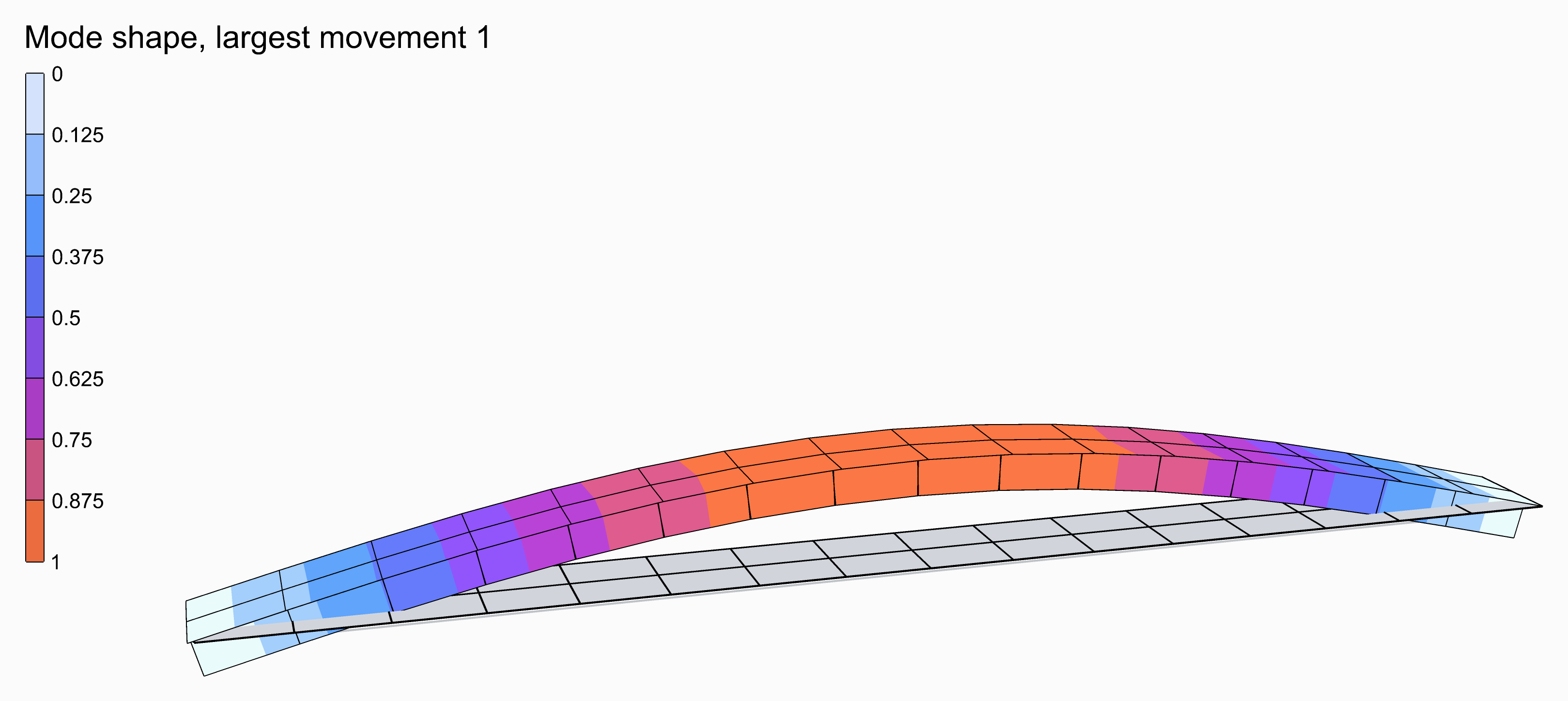
A footbridge's first mode, 2.03 Hz, coloured by how far it moves.
You need
- An assembled model from Assemble, with its supports.
- Mass: from the material's density, through the section, or from Mass Point. A Gravity Load gives force, not mass.
- The Grasshopper file saved: the component writes its files beside it.
Steps
- Wire the model from Assemble into the AlpacaModel input of Natural Vibration Analysis (Alpaca4d ▸ 07_Analysis). It needs no Analysis Settings.
- Set Vibration Modes to the number of modes you want. The default is
1. - Plug Frequencies, in
Hz, and Period, ins, into panels: one value per mode. - Wire its AlpacaModel output into Model View, with a slider on Step. Step
0is the first mode. - In Model View's Results menu, tick Deformed shape, then Animate to swing the mode through its rest and out the other side. Tick Displacement as well to colour it.
- Open the Modal Report menu under Natural Vibration, and plug ModalParticipationMassesRatio(%)_Cumulative into a panel.
Check
- TotalMassOfStructure, in the Modal Report menu, should match a hand calculation of the mass. It catches a missing density or a mis-scaled Mass Point.
- Most codes ask for 90 % of the mass in each direction in the cumulative ratios. Raise Vibration Modes until you get there.
Good to know
- A mode has no size of its own. Alpaca4d reads each mode with its largest translation 1, and Model View draws it at Deformation scale 1 with its largest movement 8 % of the model's diagonal. Its displacements and colours are relative only.
- An analysed model, from Run Analysis or Section Optimiser, can be connected too. Its modes are those of the model unloaded.
- The default Solver,
-genBandArpack, suits a few modes of a large model.-fullGenLapackextracts all of them, but only on a small model. - Unsaved, the component stops with "Have you saved the Grasshopper script?".
See also
- Natural Vibration — the inputs, the Modal Report and the solvers
- Model View — Deformed shape, Deformation scale and Animate
- Nodal Displacements — a mode shape as numbers
- Natural Vibration example — a concrete tank's first hundred modes, all drawn at once
- The Rebellious Slave — the modes of a marble statue in tetrahedra
- Response Spectrum from Sticks — a period from Natural Vibration for each of thirty models