
Steel Section Library
A catalogue of 628 steel profiles embedded in Alpaca4d. Pick a family and a name, and the component builds the matching parametric section for you.
🔧 Grasshopper component
Steel Section Library (Alpaca4d) — Alpaca4d ▸ 01_Section, nickname Section Library
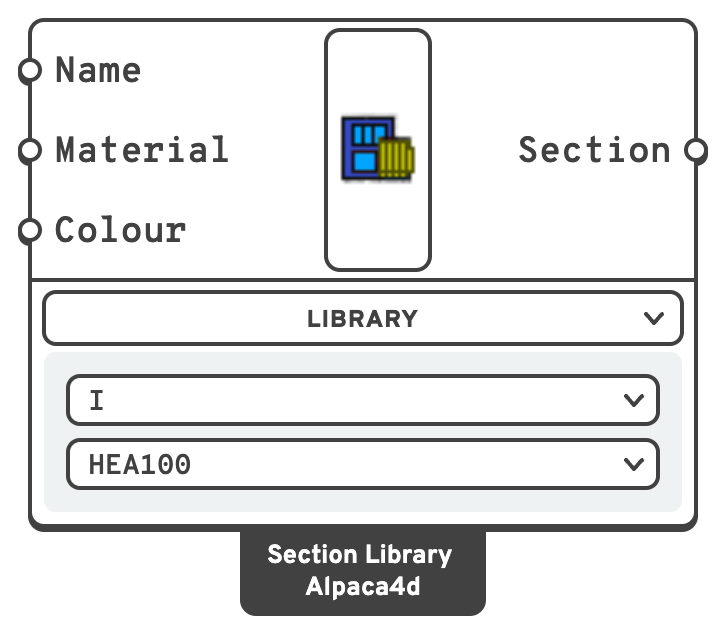
NameSection NameType a profile name directly, e.g. IPE200.
MaterialA Uniaxial material.
GapOnly present when the family is 2L or All. Clear distance between the two angles, in m.
ColourThe colour the section is drawn in when Model View colours the elements by section — every section of the list, with Section set to All.
SectionBeam section, for a ForceBeamColumn.
All, a list of them, smallest area first.Options
Two dropdowns live on the component body, under the Library menu:
| Dropdown | Values | Default |
|---|---|---|
| Family | I, 2L, O, [], All | I |
| Section | All, then the profiles of the selected family | first profile in the family |
Set Section to All for every profile of the family as a list, and Family to All for all 628. Either list is ordered by cross-sectional area, smallest first — the lightest profile at index 0 and the heaviest last — so a List Item driven by a slider walks through them by weight. Connect a Panel to the output to read the list: each section shows as its name.
| Family | Profiles | Builds a | Examples |
|---|---|---|---|
I | 90 | I Section | IPE80 … IPE600, HEA, HEB, HEM |
O | 205 | Circular | 26.9x2, 33.7x2.5, … |
[] | 246 | Rectangular Hollow | 40x20x2, 40x30x3, … |
2L | 87 | Double L-Angle | L20x20x3, L25x25x4, … |
📈 When to use it
Use it when
- The member is a standard rolled profile. Typing
HEB300is faster and less error-prone than entering six dimensions. - You are running an optimisation over a discrete set of profiles — set Section (or Family) to
Alland pick from the list with List Item and a slider, or feed your own list of names into Section Name.
Do not use it when
- The profile is welded, tapered or otherwise not in the catalogue → use the matching parametric section.
- You only have the stiffness properties → Generic Section.
🔗 Relation to OpenSees
The library resolves to one of the parametric sections, all of which write:
section Elastic $secTag $E $A $Izz $Iyy $G $J $alphaY $alphaZ