
🌊 1. River
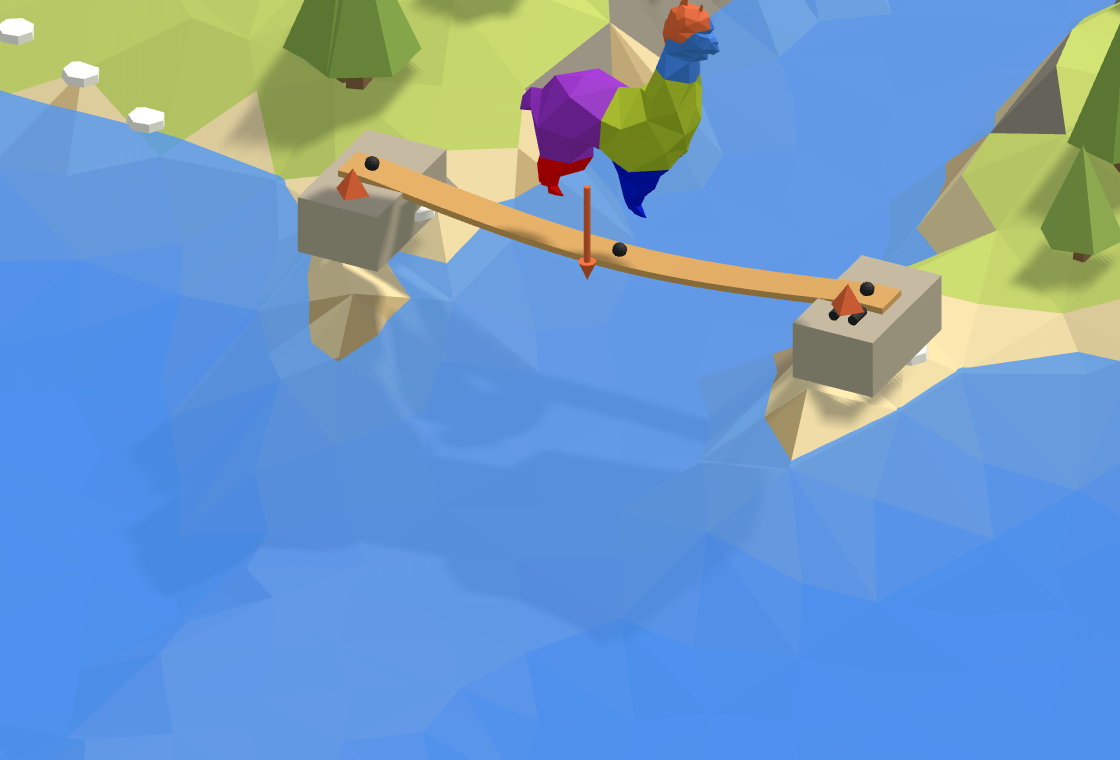
A timber plank across the river, held at both ends, with the alpaca standing on it in the middle.
A plank across. A timber plank across the river, a pin at one end and a roller at the other, with the alpaca standing on it in the middle. How far does it bend?
GHriver-start.ghGrasshopper file · download
GHriver.ghGrasshopper file · download
Start from river-start: the plank's line and its section are there, and the steps below add the rest. river is the finished definition. The same plank is the first area of the Playground, where you build it a piece at a time by picking the right Grasshopper snippet, and see what each wrong one would build.
What you will learn
- How every Alpaca4d model is built: geometry, a section, elements, supports, loads, Assemble Model, then an analysis.
- Pin and roller supports: what each holds, and why a plank needs both.
- How far a plank bends under a load at mid-span, and checking it by hand.
The plank
A C24 timber plank, 300 mm wide and 50 mm thick, lies flat across a 4 m river. The alpaca weighs 0.6 kN, about 60 kg, and stands in the middle. Alpaca4d works in metres and kilonewtons (Units), so the plank is 0.3 by 0.05, and the alpaca 0.6.
Steps
- The line. Open river-start. Bank A is at the origin and Bank B at X = 4, from the Span slider: the line runs along X, across the river. Z points up, as in Rhino.
- The section. Material Library Elastic makes C24 from the panel, and RectangleCS makes the section: Plank width 0.3 into Width, Plank thickness 0.05 into Height, the material into Material. On a horizontal beam a rectangle's Height is the side that points up, so the plank lies flat.
- The beam. The alpaca will stand in the middle, and a load has to sit on a node, so the beam needs a node there. Divide Curve with a Count of 2 gives the middle's parameter, and Shatter cuts the line there. Wire its segments into the Line of a ForceBeamColumn, and the section into Section: two elements, with nodes at Bank A, in the middle and at Bank B.
- The supports. Two Supports, their Position at Bank A and at Bank B. Every input of a Support left empty holds that way, so a Boolean Toggle, Free, False, frees what each end may do: Ry and Rz at both ends, and Tx at Bank B as well. Bank A is the pin, Bank B the roller. Both hold Rx, or nothing would stop the plank turning about its own axis.
- The alpaca. Curve Middle of the line gives the point, and Unit Z with a factor of −0.6 the force: 0.6 kN downwards. Wire them into a Point Load, and the load into a Load Pattern.
- Assemble. Into Assemble Model: the beam's Element into Elements, both supports into Supports, the Load Pattern into LoadPatterns. To wire the second support into the same input, hold Shift: a new wire otherwise replaces the one there.
- Run. An Analysis Settings as it comes, a static analysis, into the Settings of Run Analysis, and its AlpacaModel into Model View, with Deformed ticked and a Deformation scale of 8.
Check it by hand
A simply supported beam with a point load P in the middle bends there by
with L = 4 m, E = 10 500 MPa for C24 and I = bh³/12 = 0.3 × 0.05³ / 12 = 3.125 × 10⁻⁶ m⁴:
OpenSees gives 24.4 mm too. The beam's shear adds a hundredth of a millimetre.
Try
- Stand the plank on its edge: swap the wires into Width and Height. It bends 36 times less, 0.7 mm, because I grows with the cube of the depth. That is why floor joists stand on edge.
- Build both ends in: wire Free into nothing. The plank bends a quarter as much, 6.1 mm, which a plank resting on blocks does not: its ends can turn.
- Move the alpaca: replace Curve Middle by a point at another node, with Count 4 in Divide Curve to make more of them.
The usual mistakes
| You see | Why | Fix |
|---|---|---|
| A plank 300 m wide | 300 typed for 300 mm: Alpaca4d works in metres. | 0.3 and 0.05. |
| A plank 20 times too stiff | Nothing wired into RectangleCS's Material, so it took its default, steel. Grasshopper gives no warning. | Wire the material in. |
| Point load at location '…' is not part of the model! | The load sits where the beam has no node: one element, or an odd number of them. | Shatter the line so a node is under the load. |
| Input parameter Section failed to collect data | Nothing in ForceBeamColumn's Section, which has no default. | Wire the section in. |
| Analysis Failed: OpenSees 'analyze' did not converge. | Both ends free along X, or both free about X: the plank can slide or roll, so the model is a mechanism. | The pin holds Tx, and both hold Rx. |
| The plank bends up | +0.6 into Unit Z: Z points up. | −0.6. |
| Only one support in Supports | The second wire replaced the first. | Hold Shift as you wire the second. |
| Deformed shape needs an analysed model | Model View is fed from Assemble Model. | Feed it Run Analysis's AlpacaModel. |
| Input parameter Settings failed to collect data | Nothing in Run Analysis's Settings. | Wire in Analysis Settings. |
The components
- Material Library Elastic · Rectangular · ForceBeamColumn · Support · Point Load · Load Pattern · Assemble · Analysis Settings · Run Analysis · Model View