
Alpaca4D to FEM-Design
Writes an assembled model to a .struxml file that StruSoft's FEM-Design opens: its bars, plates and walls, supports and connections, one load case per load pattern, a load combination and the masses. Materials and profiles from Alpaca4d's libraries become FEM-Design's own, so FEM-Design can design with them.
🔧 Grasshopper component
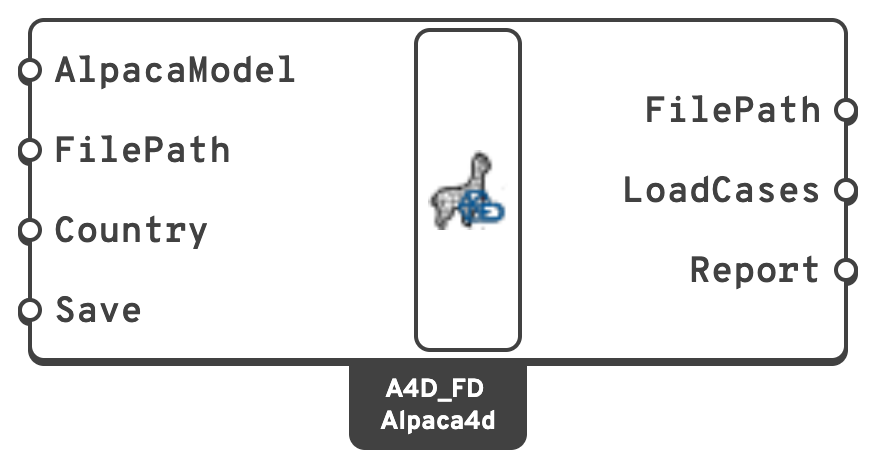
FilePathWhere to write the file.
.struxml is added when the path has no extension.CountryFEM-Design's national annex, whose material library Alpaca's materials are looked up in: common (the Eurocode's recommended values), S, N, DK, FIN, H or LV.
Sweden, Norway...true.ReportEverything the export left out or changed, errors first.
🗺️ What becomes what
Alpaca4d and FEM-Design both work in metres and kilonewtons. Masses go from kilograms to tonnes.
Materials
| Alpaca4d | FEM-Design |
|---|---|
A grade from Material Database that FEM-Design's library has, such as S355, C30_37 or C24 | That library material: S 355, C30/37, C24. FEM-Design can design with it. |
| Any other material, such as a plastic or one typed in by hand | A custom material with Alpaca's E, G, Poisson's ratio and density. FEM-Design analyses it, but does not design with it. |
A library material is analysed with FEM-Design's own values. Where its modulus differs from Alpaca's by more than 1% the report warns, and where its density differs by more than 2% it says so, since FEM-Design's self-weight follows. Alpaca's C30_37, for one, has E = 30 000 N/mm², and FEM-Design's C30/37 has 33 000 N/mm².
Sections
| Alpaca4d | FEM-Design |
|---|---|
| An IPE, HEA, HEB or HEM from the Steel Section Library, in a library steel | FEM-Design's profile of that name, when its height and width are the section's |
| A circular tube or a hollow rectangle of a catalogue size, in a library steel | FEM-Design's profile of that size: KCKR or CHS, KKR or VKR, cold-formed first |
| A rectangle in a library concrete or timber, or a solid circle in concrete | FEM-Design's concrete or timber profile of that size |
| Any other Rectangular, Circular, Rectangular Hollow, I or Double L-Angle section | A section drawn from its outline, named like Alpaca, I, 300x200x6.5x10, from which FEM-Design works out the properties |
| A Generic Section, known only by A, I and J | No section: the beam becomes a fictitious bar with the same EA, EI, GJ and mass per length, which FEM-Design does not design |
FEM-Design's library profiles have their root and corner radii, so their properties differ a little from those Alpaca computes for the same profile.
Elements
| Alpaca4d | FEM-Design |
|---|---|
| Force Beam Column | A beam, or a column when it is vertical. A column drawn downwards is turned to run upwards. |
| Beam With Hinges pinned at both ends, with no beam load on it | A truss |
| Any other Beam With Hinges | A beam or column with the same end releases |
| Shell elements | Plates, and walls where they are vertical. The elements of one section that share edges and lie in one plane become one plate, holes included. |
| Spring Link | A point connection with the link's springs, in the link's axes |
| Brick, Ten Node Tetrahedron | Not exported |
FEM-Design's local z runs along the depth of a section, which is Alpaca's local y, so a beam keeps its orientation. A beam's ElementId becomes its name in FEM-Design, numbered: Column.1, Column.2... Beams without one are B.1, C.1, T.1 and BF.1 for beams, columns, trusses and fictitious bars; plates are P.1 and walls W.1.
Trusses. A Beam With Hinges is a truss when both ends are free to turn in bending, every translation is held, and torsion is released at one end at least, which is how a truss is modelled in Alpaca4d. A member loaded along its length carries bending between its hinges, which a FEM-Design truss cannot, so it stays a beam with hinges. A beam load without an element loads every beam, trusses included.
Plates. Shell elements are merged so that FEM-Design gets a few plates to mesh rather than one per element. A warped quad, whose corners are not in one plane, becomes two triangles. Where an opening touches the edge of a plate, or another opening, at a single corner, the outline would touch itself, which FEM-Design does not take. Those elements become one plate each. A layered shell section becomes a plate of its full thickness in the material of its thickest layer.
Supports and constraints
| Alpaca4d | FEM-Design |
|---|---|
| Support | A point support in the support's axes, rigid in what it holds and free in the rest |
| Rigid Link | A point connection: rigid in translation for bar, in every direction for beam |
| Equal DOF | A point connection, rigid in the tied directions only |
| Rigid Diaphragm | A diaphragm over the outline round its nodes |
FEM-Design joins whatever meets at a point, so an Equal DOF or a Rigid Link between two nodes in one place has nothing left to do there. It is not exported, and the report says so: release the element's end instead. A FEM-Design diaphragm makes everything inside its outline rigid in its plane. It has no retained node, so a load or a mass on that node needs an element there to go on.
Loads and masses
| Alpaca4d | FEM-Design |
|---|---|
| Load Pattern | A static load case with the pattern's name, or LP1, LP2... for a pattern without one |
| Gravity | The dead-load case Self-weight, in which FEM-Design works out the self-weight from its materials |
| Point load | Point loads, for the force and for the moment |
| Beam load | A uniform line load along the bar |
| Shell load | Surface loads over the parts of each plate that carry the same pressure |
| Mass Point | A point mass, the same in every direction |
| A Uniform Excitation pattern | Not exported |
Alpaca4d applies every load pattern of a model at once. The combination Alpaca does the same in FEM-Design: it adds every load case with its pattern's factor, times its time series' factor, and the self-weight with its gravity factor. A linear analysis of it is the analysis Alpaca4d runs.
Note
FEM-Design's design checks depend on what each load case is, and Alpaca4d does not know. Load cases come in as static and permanent, and the combination as ultimate, ordinary. Set their types, durations and the combinations you need in FEM-Design.
📋 The report
Whatever the export cannot carry over is reported, on the component and in Report:
- an error when leaving it out changes the structure or its loads, such as a solid element or a dynamic excitation;
- a warning when it is approximated, such as a warped quad or a material whose modulus differs from FEM-Design's;
- a remark when it changes nothing but is worth knowing, such as a custom material or the number of elements exported.
Saving checks the file against FEM-Design's schema; anything that fails the check is an error, since FEM-Design would not open the file as it is.
📈 When to use it
Use it when
- The structure has been shaped and checked in Grasshopper, and is to be designed in FEM-Design: steel, concrete and timber checks, reinforcement, connections, reports.
- You want a second opinion on Alpaca4d's results from another program.
Do not use it when
- You want FEM-Design's results back in Grasshopper. The export goes one way only.
Note
FEM-Design runs on Windows, but the file can be written anywhere, Rhino for Mac included, and opened in FEM-Design afterwards.