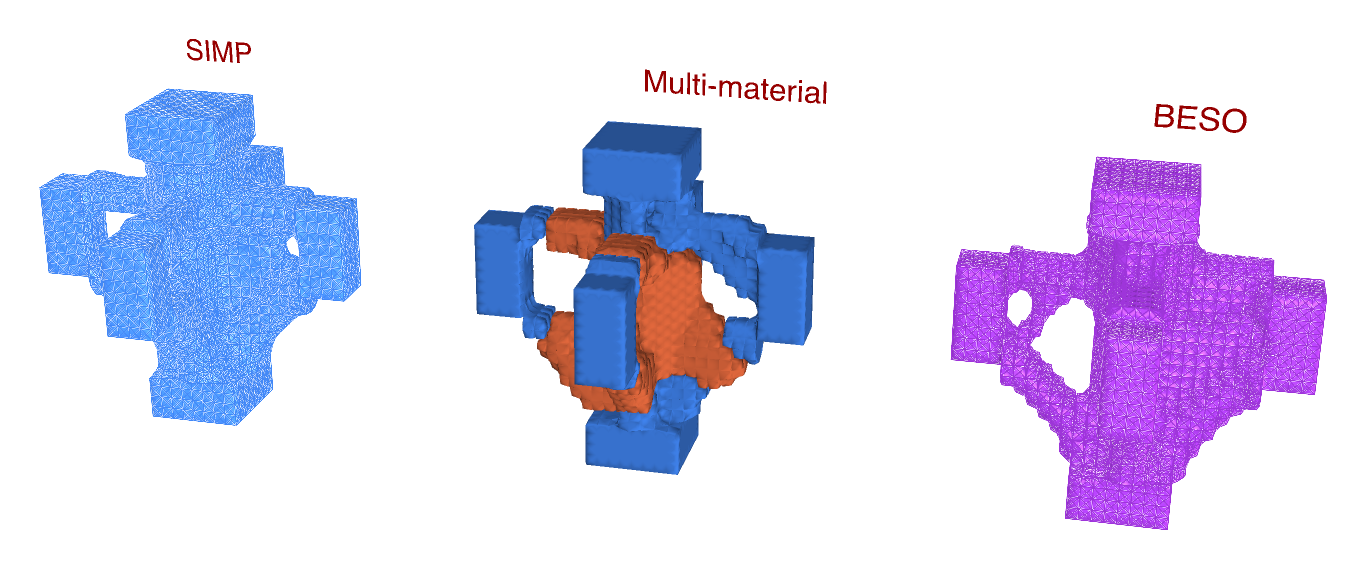
Where an interior beam-column joint needs its material, found three ways side by side: by Topology Optimisation, BESO Topology and Multi-Material Topology. A column and four beams meet at a cube of steel bricks, 1 m a side:
- the column, 0.4 m square, held at its foot below the cube and bringing 1 500 kN down at its head above it;
- four beams, 0.2 m wide and 0.4 m deep, from 0.4 to 0.8 m up, each bringing its shear and a hogging moment: 150 kN and 150 kNm from +x, 150 kN and 80 kNm from -x, 100 kN and 100 kNm from +y and from -y.
The moments along x do not balance, so the joint has to take 70 kNm into the column, and it works in three dimensions. Each member is a stub of bricks 0.2 m long, kept solid whatever the optimisation finds. A beam's hogging moment reaches its end as a couple: the top half of the end pulled out and the bottom half pushed in, each by 2M/d.
INFO
Without a license, the three components run on models of up to 500 elements. At 2 bricks per 10 cm this one has 9 024, so it needs one; at 1, 1 128 bricks, it still does.
The model
| Group | What it does |
|---|---|
| 1 - How fine | Bricks per 10 cm, 1 to 3, the same every way, so that every member's edges fall on the grid: 1 000, 8 000 or 27 000 bricks in the cube. |
| 2 - The node | The cube, 1 m a side: its plan meshed once with Mesh Plane, copied up level by level and made into bricks by Mesh Series to Brick, as SSP Bricks named Node. |
| 3 - The members | The column above and below and the four beams, each a box of bricks, all through one chain of components, each in a branch of its own. The bricks are named Member. |
| Materials | Steel, E = 210 GPa, for every brick, and concrete C30/37, E = 33 GPa, for Multi-Material Topology to choose. |
| 4 - Supports and loads | The column's foot held by a Support. The column's head, and each beam end's shear, top half and bottom half, each meshed with Mesh Plane to find its nodes, its force divided among them as Point Loads. |
| 5 - Assemble Model | Assemble. Model View is disabled: enable it to see the supports and loads. |
| 6 - Three ways | Keep names the members. Topology Optimisation and BESO Topology keep 20% of the cube (VolumeFraction); Multi-Material Topology up to 6% in steel and 14% in concrete. Each has its Run, Iterations and Step, and a panel of its compliance. |
| 7 - Side by side | Topology Optimisation's design moved 2 m to the left, BESO's 2 m to the right; Multi-Material Topology draws its own, in its materials' colours, where the model is. |
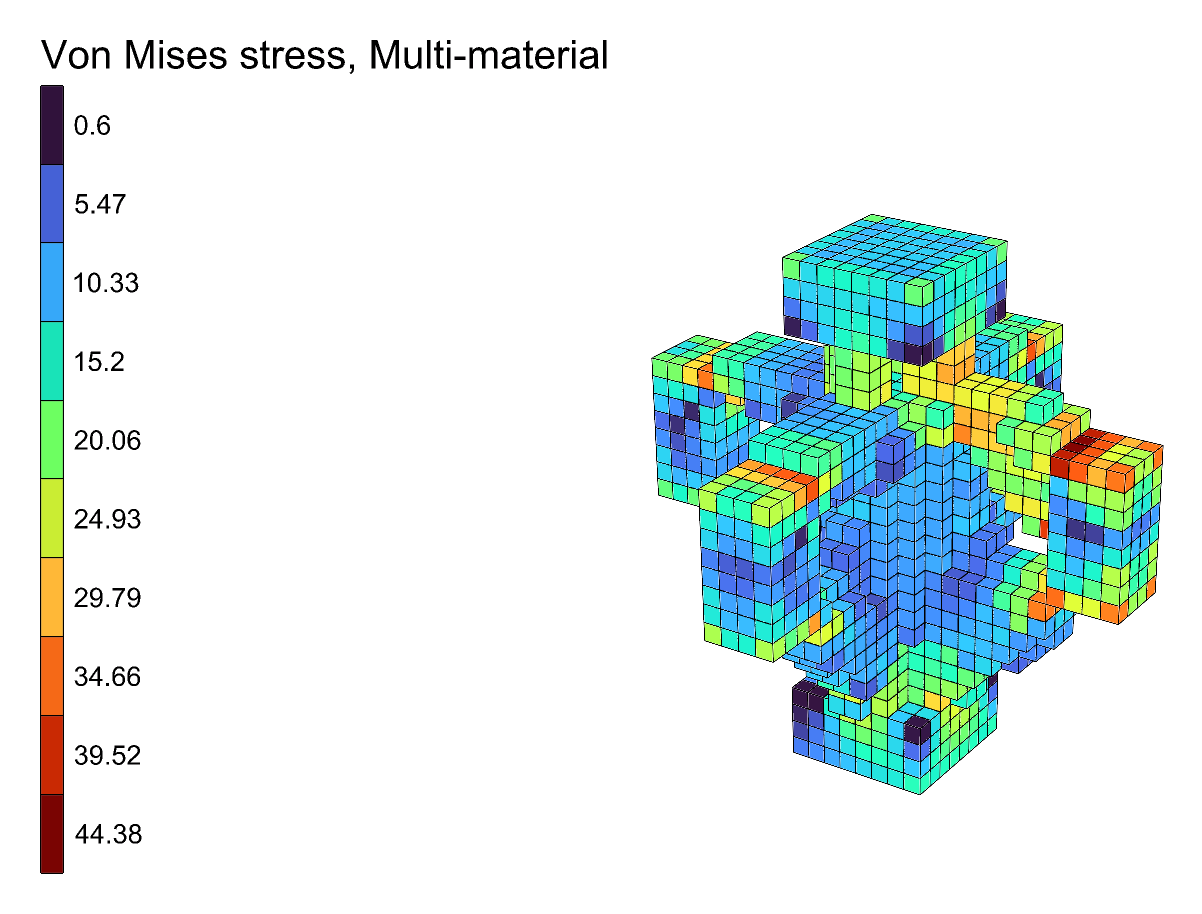
| 8 - Each design analysed | For each method, Run Analysis on its AlpacaModel and View Results in Von Mises stress, with a Legend; locked to start with. |
Running it
- Set one Run to
trueat a time. The run goes on its own thread and its design draws in its place in group 7. At 2 bricks per 10 cm, on an Apple M2 Pro, Topology Optimisation takes about a minute and a half, BESO Topology under a minute and Multi-Material Topology four to five minutes. - Drag a Step slider back to watch that run again.
- Once a run has stopped, enable its Run Analysis and Legend in group 8 to see its design in Von Mises stress, where the model is. Lock them again before enabling another's.
WARNING
BESO at 1 brick per 10 cm. At the coarsest fineness BESO Topology cuts a member through, in
two steps, after iteration 108, and never mends it: it says so in a warning, and Converged
stays false. Use 2 bricks per 10 cm, the default, or 3.
What it shows
All three find the joint a structural engineer would draw: ties across the top of the joint, from each beam's top - in tension under the hogging moments - to the one opposite; struts under them, from each beam's bottom into the column; and the column carried through the middle. The unbalanced moment along x shows: each method puts a fifth to a third more material on the +x side, where the beam brings 150 kNm, than on the -x side, where it brings 80; along y, where the beams balance, the joint comes out exactly symmetric.
| Iterations | Compliance | |
|---|---|---|
| Topology Optimisation | 160 | 0.358 |
| BESO Topology | 94 | 0.280 |
| Multi-Material Topology, 6% steel and 14% concrete | 265 | 0.675 |
Multi-Material Topology puts the concrete into the column's core and the struts, and the steel into the ties across the top. It chooses only by stiffness - it knows nothing of concrete cracking - but the ties are where a thin member does most, and the core where there is room for a thick one.